


Loader.to Review 2026: Is It Still Safe for 4K Downloads? (The Real Truth)
While most online YouTube downloaders limit you to a blurry 720p or even 360p, Loader.to has long been a go-to for those chasing crisper 4K quality. But the landscape is shifting. In 2026, is Loader.to still a reliable ally, or has it become a risky shortcut?
This comprehensive review will clear up your confusion! We put Loader.to through a rigorous test, benchmarking its actual 4K output, cybersecurity, and stability. Read our verdict to see if Loader.to is still worth your time, or if it's finally time to move on.
- • Part 1: What is Loader.to?
- • Part 2: Real-World Test: Is Loader.to Good Enough?
- 2.1 Safety Check: Is Loader.to Safe?
- 2.2 Loader.to Performance Benchmark: 4K Quality & Stability
- 2.3 2.3 The Playlist Challenge: Can Loader.to Truly Handle Large Playlists?
- • Part 3: Pro Alternatives to Loader.to: Faster, Safer, and Truly 4K-Ready
- • Part 4: FAQs about Loader.to and 4K Download
Part 1: What is Loader.to?
Loader.to is one of the prominent sites designed to extract both video and audio from YouTube and other major sharing platforms. Loader.to has built its reputation on the ability to extract Ultra-HD media, claiming to convert online content into various high-fidelity formats, including stunning 4K resolution.
• Multi-platform support: YouTube, Vimeo, SoundCloud, Facebook, TikTok, Twitter (X), Twitch, and IMDb
• Various formats support: MP3, MP3, WEBM, M4A, AAC, FLAC, OGG, WAV
• 4K quality support: Download videos in stunning 4K resolution at 60FPS with HDR support
• Zero installation: Entirely browser-based with no software to install and no registration required
But does it deliver on these promises in 2026? To verify if it remains the best choice for high-quality downloads, we put Loader.to through a series of real-world tests. Let's dive in.
Part 2: Real-World Test: Is Loader.to Good Enough?
As Loader.to remains one of the reliable choices for standard YouTube to MP3 conversion and HD (1080p) downloads, and the real challenge lies in Ultra-HD content, this testing specifically focuses on its 4K download capabilities.
To determine if Loader.to remains the great choice for 4K video downloading, we conducted a performance audit. This testing monitored the entire user journey, including end-to-end security checks, UHD (4K/8K) output, and playlist download capabilities.
To ensure a fair and objective benchmark, we processed a diverse batch of 20 YouTube files, all targeted at 4K resolution. Let's dive into the verdict and see how Loader.to actually performed.
2.1 Safety Check: Is Loader.to Safe?
There is no doubt that safety is the foremost consideration when we choose a web-based tool. During our test, we scrutinized the safety of the entire browsing and downloading experience. Is Loader.to a secure haven for your downloads, or a gateway to unwanted risks? Here is the breakdown of our security audit.
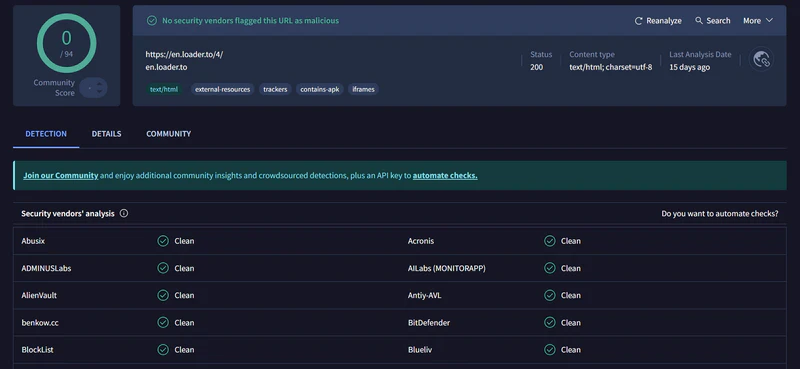
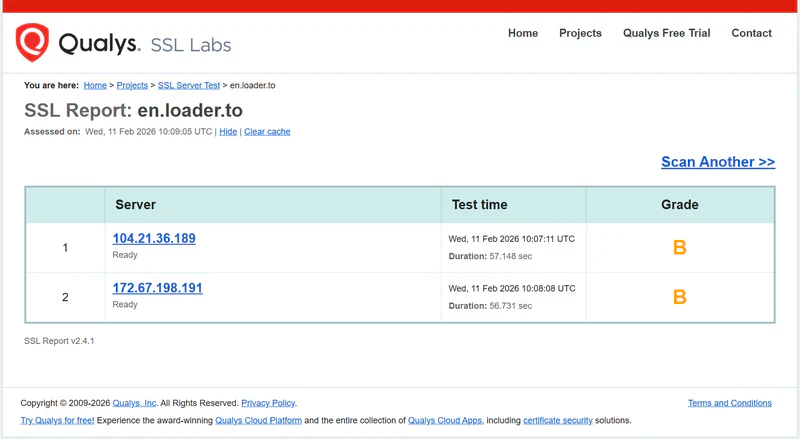
2.1.1 The security check by the third-party audit tools
Verdict: No malicious flags, no viruses, malware, or phishing links detected. But this is not enough; let's run live downloads to monitor the site's acutual behavior.
2.1.2 The security check in the live downloads
First of all, at a glance of its main interface, which contains three ads: one is behind the download button, and the other two are located at the bottom of the screen to promote its mobile app and extension.
Then, after clicking the download button, we were redirected to gambling or bitcoin sites. Two times to click the download button, and 2 redirects.
After downloading, we scanned the downloaded files, and no malware and virus found.
Verdict: Unlike the donation-driven platforms like CnvMP3, Loader.to relies on aggressive advertising as its revenue model. While the tool itself is not a 'visurs', the aggressive ads and click-to-redirects make the downloading experience feel like walking through a digital minefield. As the old saying goes, there is no such thing as a free lunch.
2.1.3 Pro Tips: How to use Loader.to safely (safety protocols)

2.2 Loader.to Performance Benchmark: 4K Quality & Stability
To verify if Loader.to is truly '4K ready' in 2026, we tested 20 diverse files, ranging from 3-minute music videos to 1-hour 4K nature, and here are 6 representative cases that highlight Loader.to's real-world performance.
| Video Type | Target Quality | Actual Quality | Output Format | Output Size | Download Time | Status |
| Music Video (3m) | 4K | 1080P | MP4 | 98.3MB | 8m57s | ⚠️ Downgraded |
| Nature HDR (10m) | 4K | 1080P | MP4 | 378MB | 23m34s | ⚠️ Downgraded |
| Tech Review (22m) | 4K | 1080P | MP4 | 405MB | 28m20s | ⚠️ Downgraded |
| Drone Scenery (35m) | 4K | 1080P | MP4 | 3.2GB | 40m37s | ⚠️ Downgraded |
| Travel Vlog (51m) | 4K | 1080P | MP4 | 1GB | 47m36s | ⚠️ Downgraded |
| Gaming Clip (25m) | 4K | 1080P | MP4 | 1.1GB | 43m20s | ⚠️ Downgraded |
Verdict 1: The "4K Illusion"
The data for 20 testing files reveals a consistent "4K Illusion": despite selecting 4K output, the actual downloaded files were systematically downgraded to 1080p or 1440p. This is not a fandom glitch, but a fundamental limitation of web-based processing engines.
If you want to know why web tools struggle to handle true 4K/8K data streams, please refer to FAQ #4: Why do online 4K downloaders often fail?
Verdict 2: The Long-Form Barrier
When attempting to download a 3-hour 4K game video, Loader.to hits its limit. Instead of processing the file, the system triggered an error message stating the video "cannot be converted" and recommended its separate app. This is a common bottleneck for most web-based tools struggling with massive data streams.
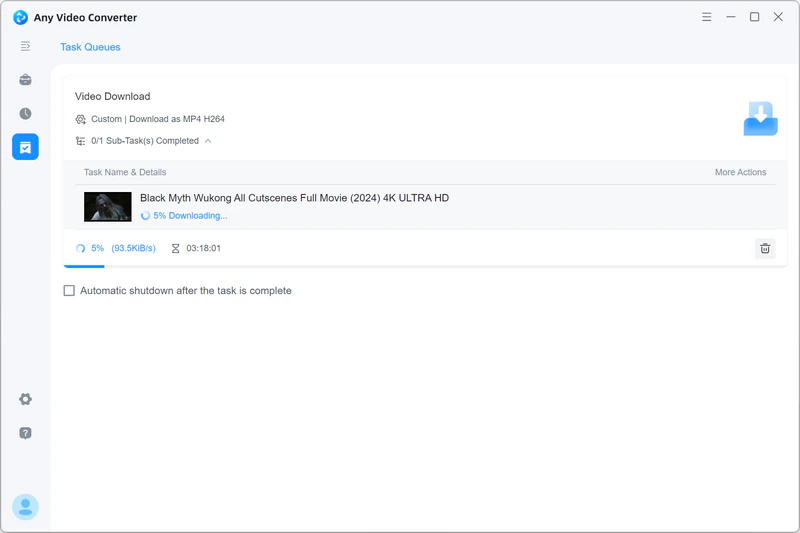
To see if this marathon download was even possible, I switched to Any Video Converter. As shown in the screenshots, the desktop local engine handles the multi-gigabyte file effortlessly, maintaining a stable connection and truly 4K quality with a single hiccup.
Successfully Analyzed:
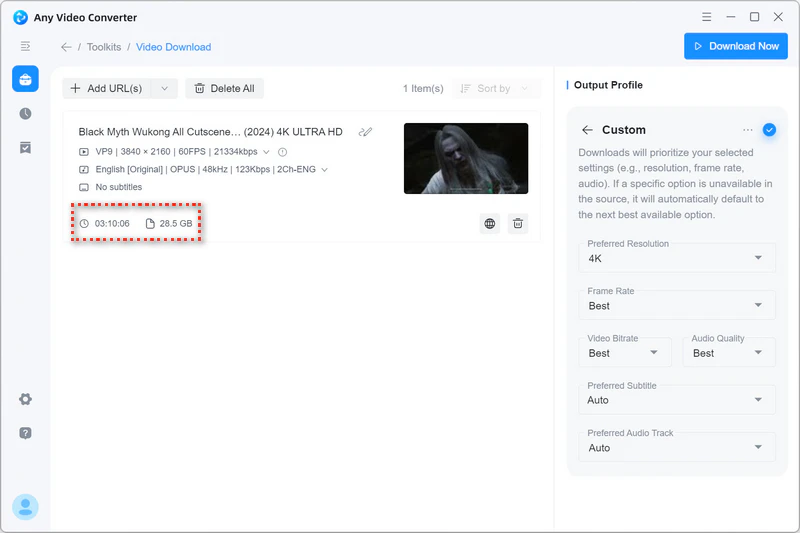
Start Downloading:
2.3 The Playlist Challenge: Can Loader.to Truly Handle Large Playlists?
When attempting to add a playlist or channel URL, Loader.to appears to support playlist and channel URLs by correctly identifying the number of videos in a list, but it fails in execution. This means Loader.to cannot handle native bulk downloading or automated channel/playlist backups in its web version.
If you need a reliable way to grab an entire 4K playlist or a full channel's worth of content in one click, please refer to [Part 3.3: How to Download 4K Videos (and Playlists) for Free].
Part 3: Pro Alternatives to Loader.to: Faster, Safer, and Truly 4K-Ready
If you are tired of silent 4K videos (video only, no audio), compromised quality, aggressive ads, and the frustrations of failed long-form downloads, it is time to move to a dedicated desktop solution. For those who value their digital security, time, and media quality, Any Video Converter is the ultimate upgrade.
3.1 Why Any Video Converter Beats Online Tools
• Universal platform support: Free download video and music from 1000+ sharing sites.
• Diverse output formats: Including MP4, MP4 H264, MKV, MP3, M4A, WAV, and FLAC.
• True 4K/8K output: Preserve the original best quality, including HDR and 60FPS fluidity.
• Batch & Playlist Downloading: Download multiple videos simultaneously or capture an entire playlist.
• Smart Custom mode: Save your preferred download configurations as one-click presets.
• Built-in Browser: Log in to your account to download private or member-only content.
• A Clean, Secure Workspace: Enjoy a 100% ad-free and risk-free environment.
• Hardware-Accelerated Speed: Leverage GPU acceleration to boost download speeds by 1.5X to 3X.
3.2 The Redemption Test: Any Video Converter
To see if a desktop solution truly makes a difference, we ran the same 6 files through Any Video Converter.
3.3 How to Download 4K Videos (and Playlist) with Any Video Converter
Switching from a web tool to a professional desktop solution sounds a bit complex, but Any Video Converter makes it even simpler. Here is how to easily get 4K content (including playlist) from YouTube with Any Video Converter.
Step 1: Add URL(s)
Launch Any Video Converter, and open the 'Video Download' tool from the main dashboard.
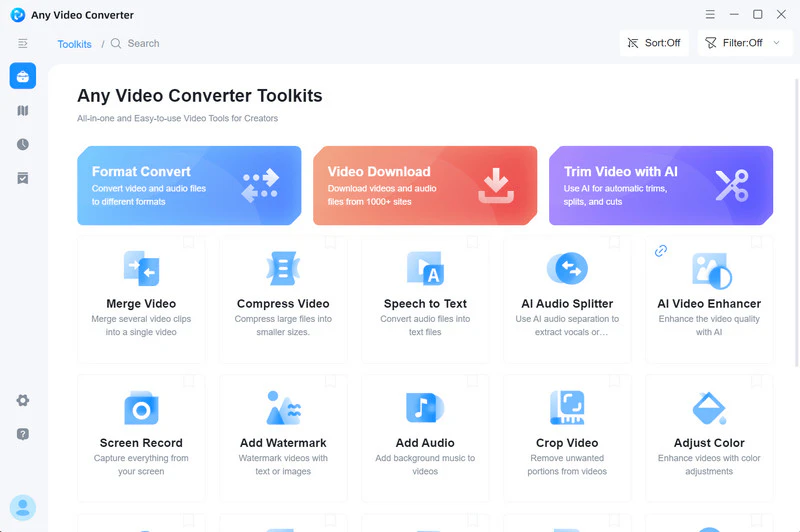
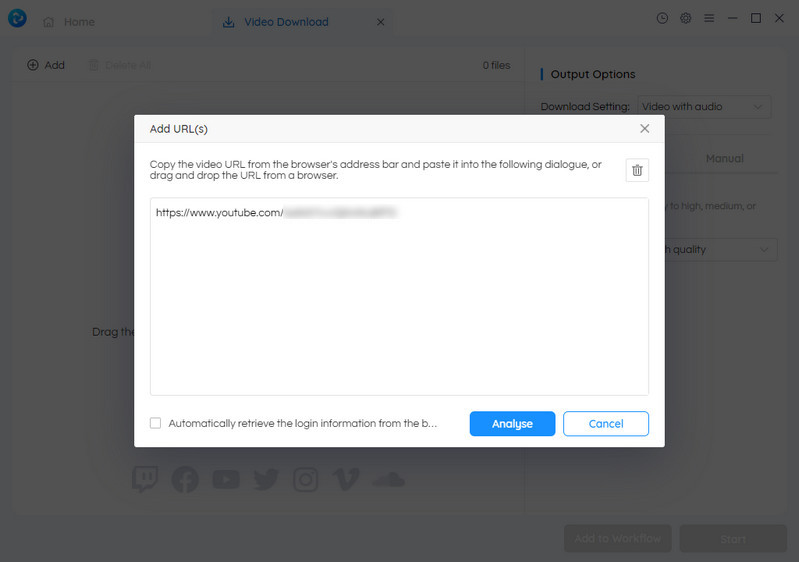
Simply copy the URL of the YouTube video or playlist you want to download and click the 'Add URL(s)' button.
Tips: You can paste multiple links to initiate a batch download.
Step 2: Select Output Quality
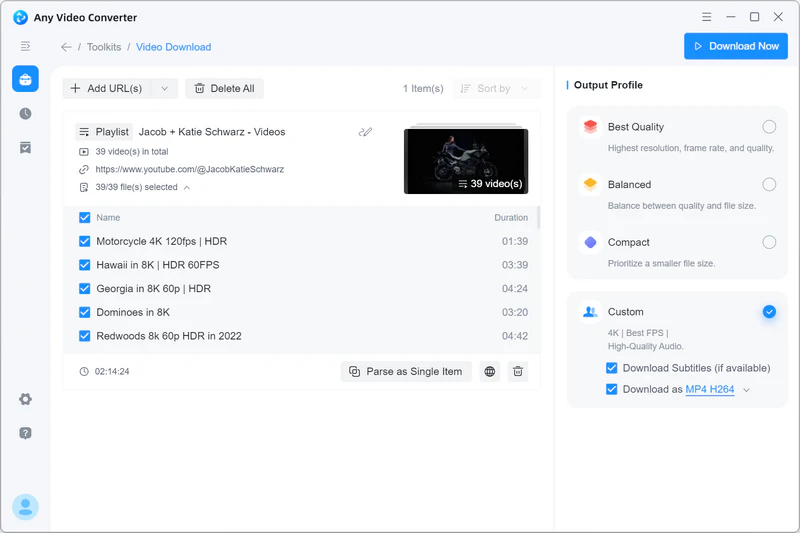
For free users, they can choose 'Best Qaulity' to automatically grab the highest available resolution for free.
For premium users, switch to 'Custom' mode to unlock full control over resolution, FPS, bitrate, output format, audio tracks, and subtitles.
Step 3: Start Downloading
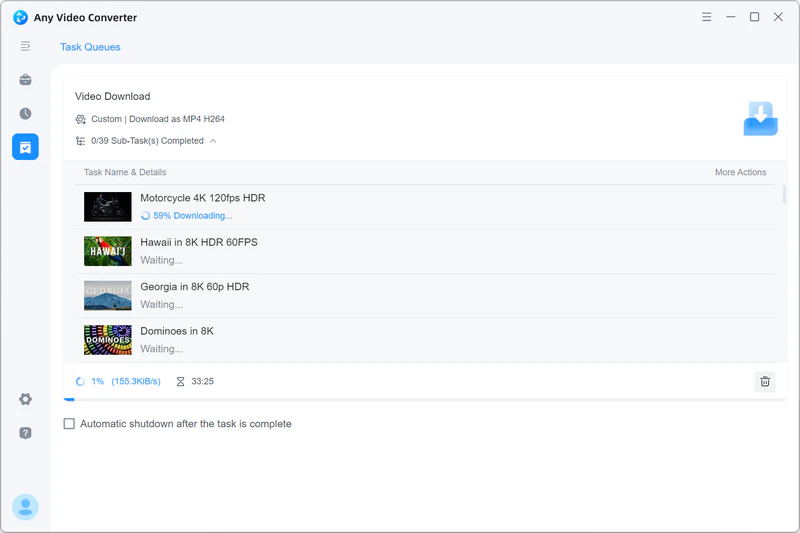
Click the 'Download Now' button to start downloading 4K videos from YouTube in batch with Any Video Converter.
Part 4: FAQs about Loader.to and 4K Download
Q1. Is Loader.to safe?
A: Technically, Loader.to itself does not host viruses. However, its safety is compromised by an aggressive advertising model. To stay safe, you are strongly recommended to install a robust ad-blocker extension before visiting. This will effectively stop most malicious redirects before they open. Most importantly, remember to ignore all pop-up alerts (such as 'system updates' or 'virus detected') and never click on any ad banners.
Q2. Did Loader.to removed 4K video download?
A: Our tests confirm a frustrating truth: Yes, Loader.to effectively no longer supports true 4K downloads. Although the '4K' resolution remains a selectable option, the final output was actually downgraded to 1080p or 1440p, regardless of whether the source video is 4K or higher.
Q3. Are there any decent browser-based YouTube downloaders left?
A: Yes, there are still safe and reliable web-based YouTube downloaders left. CnvMP3 stands as the safest one, as it is donation-driven rather than relying on aggresive ads network.
However, if you choose to use the ad-driven sites like Loader.to, safety is not fully guaranteed by default. You can only stay protected by using the ad-blocker and be cautious with ads, pou-ups or alerts.
Q4. Why do online 4K downloaders often fail?
A: The primary obstacle is a technology called DASH (Dynamic Adaptive Streaming over HTTP). Unlike standard HD or SD videos, YouTube stores the video and audio of 4K and 8K videos separately in two streams on its servers. To give you a 4K video with sound, a downloader must download both files and merge them. This requires significant CPU power and RAM. However, most web tools can not afford to do this. Instead, they either give you a video only (no sound) or downgrade you to 1080p.
Q5. What's the difference between 4K in MP4 and 4K in WebM?
A: For efficiency (smaller size and smooth online streaming), YouTube stores its 4K or 8K content natively in the WebM (VP9/AV1). Most of the online 4K downloaders often lack the power to convert these massive files into MP4 in real-time. Instead, they just give you the "raw" WebM file.
Pro Tips: One of the biggest reasons to use Any Video Converter is its ability to download the high-quality 4K WebM stream and automatically convert it to a high-bitrate MP4 (H.264) during the download process. You get the best of both worlds: 4K quality with universal compatibility.
Final Verdict: Is Loader.to Still Worth?
Our extensive tests confirm a simple truth that Loader.to is a quick fix for YouTube to MP3 and YouTube to MP4 (HD) downloading, not a stable and long-term solution, especially for 4K content and playlist downloading. If you are power users who demand genuine 4K/8K quality, bulk download capabilities, lightning-fast speeds, and ad-free stability, Any Video Converter is the ultimate go-to solution that transforms a frustrating "trial-and-error" process into a seamless, high-speed, and high-quality experience.
Download Any Video Converter right now to download 4K videos for free!


Charlie Campbell | Content Writer
Charlie Campbell is an experienced technical documentation writer with a background in software development and a passion for emerging AI technologies. Dedicated to helping readers stay ahead in the fast-paced digital landscape, he combines technical expertise with clear communication to simplify complex topics and keep audiences informed on the latest advancements.