


How to Download YouTube Videos in MKV Format [High-Quality & Free]
YouTube is one of the most popular websites for hosting, sharing, and downloading videos. MKV is a video format that supports multiple tracks and high bitrates. Converting YouTube videos to MKV can preserve the best video quality (1080P/4K) and audio quality.
However, are there free YouTube to MKV converters? How to download YouTube videos to MKV? How to preserve YouTube subtitles/audio tracks? This article will answer all your questions so you can enjoy your favorite videos offline in the highest quality possible.
- • Part 1: Why Download YouTube Videos to MKV, Not MP4 Files?
- • Part 2: Any Video Converter - YouTube to MKV Converter for Windows & Mac
- • Part 3: Youtube4KDownloader - Online YouTube to MKV Converter
- • Part 4: Seal - Convert YouTube to MKV on Android
- • Part 5: Command Line Tool - Download YouTube to MKV with yt-dlp
- • Part 6: FAQ About Converting Video to MP4 Online
Part 1: Why Download YouTube Videos to MKV, Not MP4 Files?
🔴 The benefits of downloading YouTube videos as MKV format include:
- MKV natively supports various video, audio, and subtitle formats, such as H.265 video, Opus audio, and ASS dynamic subtitles. MP4, on the other hand, is much more limited.
- If a YouTube video has multilingual subtitles or multiple audio tracks, MKV can save it as is. This is especially true for complex subtitle formats (SRT, ASS/SSA, VOBSUB, PGS), which display more accurately in MKV. While MP4 also supports multiple audio tracks and subtitles, its compatibility is poor.
- If you download high-quality videos such as 4K HDR or Blu-ray discs, MKV will perfectly preserve all image and audio quality information. MP4, for compatibility reasons, may compress quality and lose details.
❓ In what situations is it better to use MP4?
- If you need to play the video directly on your phone, tablet, or editing software, YouTube to MP4 file offers wider compatibility.
- If you don't have any other advanced requirements and prefer smaller file sizes, the MP4 format is sufficient.
- In daily life, the MP4 format is perfectly usable.
A Table Comparing YouTube to MKV Converters
| System | Video Quality | Audio Track | Subtitle | HDR Support | Easy of Use | |
| 🥇Any Video Converter | Download Win Download Mac |
Extremely high | Multiple audio tracks available | Embedded subtitles | ✅ | Super easy ⭐⭐⭐⭐⭐ |
| Youtube4KDownloader | Online | 4K | Single audio track | Subtitles need to be downloaded separately | ❌ | ⭐⭐⭐⭐⭐ |
| Seal | Android | 4K/8K | Multiple audio tracks available | Embedded subtitles | ❌ | ⭐⭐⭐ |
| yt-dlp | Command line tool on PC | Extremely high | Completely preserved | Completely preserved | ✅ | ⭐ |
Part 2: Any Video Converter - YouTube to MKV Converter for Windows & Mac
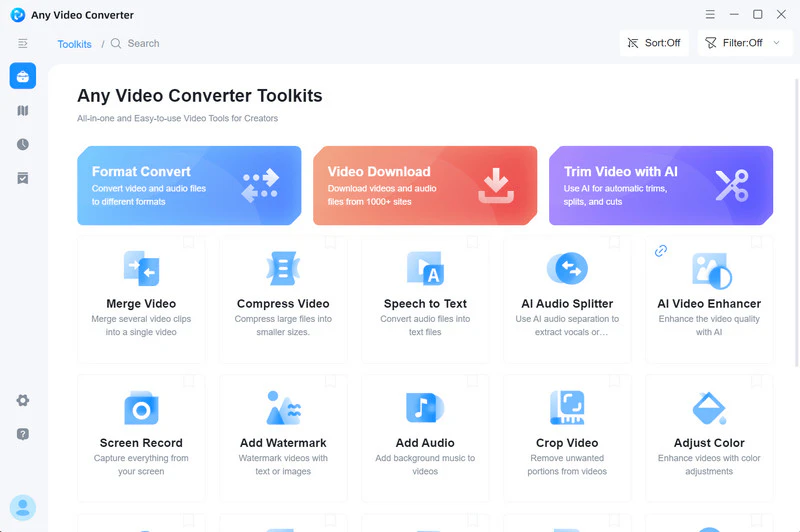
❓ Why choose Any Video Converter:
- It supports downloading up to 4K/8K/HDR videos from YouTube and preserves the original quality and details in MKV format, avoiding secondary loss caused by transcoding and compression.
- Any Video Converter helps you download YouTube videos with original subtitles and multilingual dubbing. You can freely choose the video/audio track you want.
- It allows you to add YouTube links in bulk, outputting them as MKV files while storing YouTube video titles, authors, and other information, making it easy to organize your personal media library.
📌 Key Features of Any Video Converter:
- Download original 4K, 8K, HDR YouTube content.
- Download YouTube videos directly as MKV without secondary conversion.
- Fully preserve video/audio tracks, subtitles, and other information.
- Get download and conversion results quickly, reducing waiting time.

How to Download YouTube to MKV on Windows & Mac
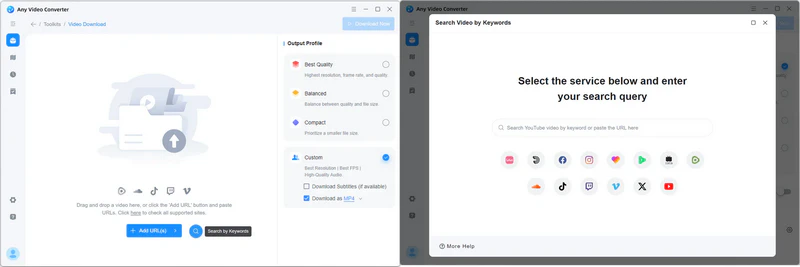
Step 1: Click on "Video Download" in Any Video Converter.
Step 2: Click the magnifying glass button to enter the built-in YouTube browser (which can improve the success rate of downloads) and log in to your account.
Step 3: Search for and play the YouTube video you want to download to MKV, then click "Parse Now" to start parsing the video link.
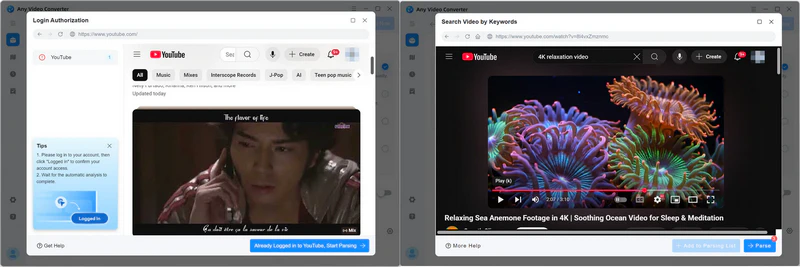
Step 4: Enable the "Download as MKV" option in the "Custom" section on the right.
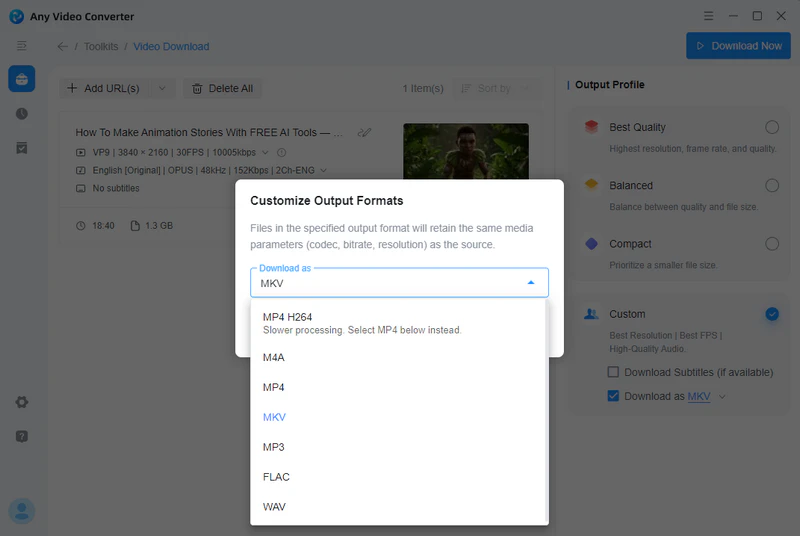
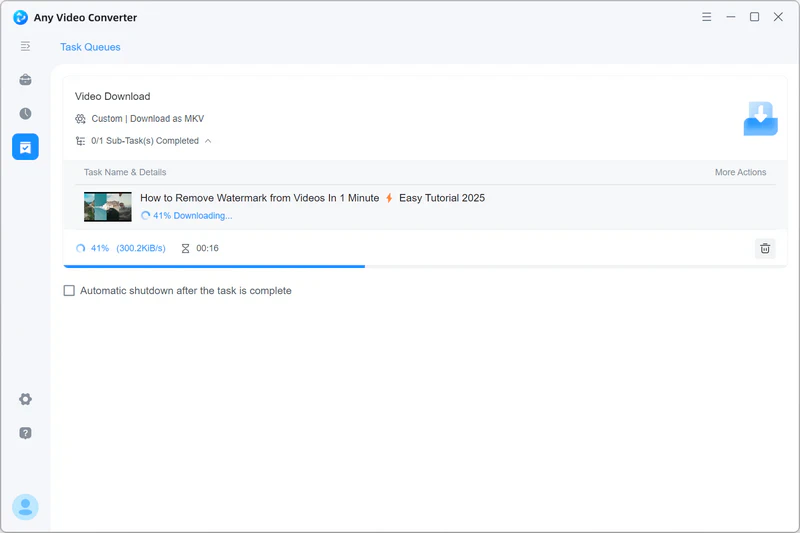
Step 5: Click "Download Now" to directly download YouTube videos to MKV files.
Part 3: Youtube4KDownloader - Online YouTube to MKV Converter
❓ Why choose Youtube4KDownloader:
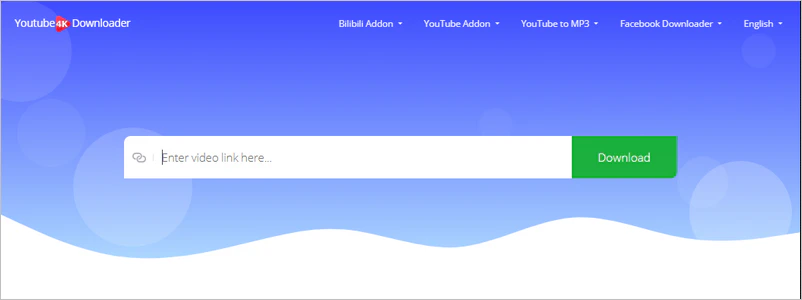
- This online YouTube to MKV converter is a rare find, supporting the download of 4K/8K UHD YouTube videos to MKV format while preserving multilingual audio. It can also store metadata such as video titles and descriptions.
📌 What you should know:
- Unable to batch download YouTube videos as MKV.
- Unable to store subtitles.
- Cannot preserve HDR/60fps features.
How to Convert YouTube to MKV Online
Step 1: Open the YouTube4KDownloader website and paste a YouTube URL.
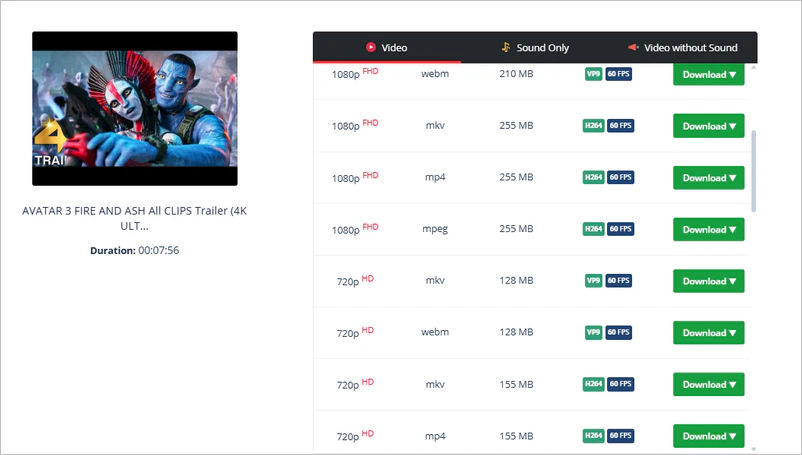
Step 2: Simply select the MKV format from the provided options to download.
Part 4: Seal - Convert YouTube to MKV on Android
🔓 What is Seal:
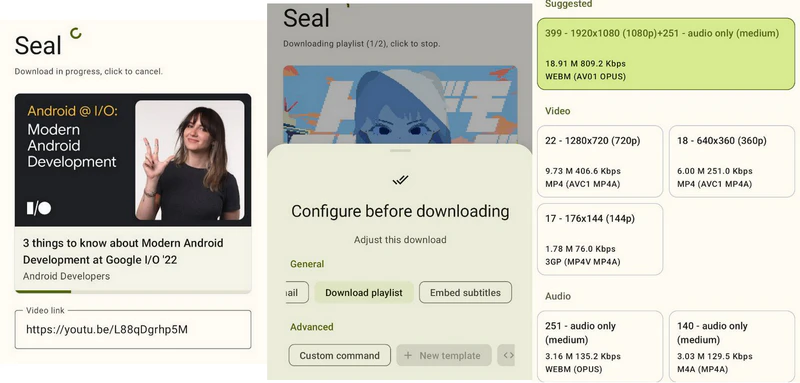
- Seal is an open-source video/audio downloader designed specifically for Android phones. Its core engine is the powerful command-line downloader yt-dlp, which allows it to support a wide range of websites, including YouTube.
🔗 How to install:
- You cannot download it from Google Play; you need to download and install it from its official GitHub page: https://github.com/JunkFood02/Seal.
❓ Why choose Seal:
- Most video download apps only offer the basic MP4 format. However, Seal also supports the MKV format, allowing you to easily obtain multi-track audio, subtitles, chapters, and other information from YouTube videos on your mobile device. All features are free!
📌 What you should know:
- Due to the limited processing power of mobile phone processors, the conversion speed of 4K/8K videos is slow, and the phone may overheat.
- Compared to professional computer software, mobile apps offer fewer parameter options.
- HDR not supported.
How to Convert YouTube to MKV on Android
Step 1: Open the SEAL app. The main interface usually has a prominent "Paste Link" area; click it, and SEAL will automatically paste the YouTube link you just copied.
Step 2: Click the "Parse" button or a similar button, and Seal will begin retrieving a list of available video formats. Once parsing is complete, you will be taken to a format selection list.
Step 3: You need to select a video stream (e.g., 1080P, VP9) and an audio stream (e.g., 128 kbps, OPUS). Sometimes the list may include MKV format, which you can also select directly.
Step 4: Click the "Settings" icon in the upper right corner to check the final video format, file name, and download path to start downloading the YouTube video to MKV.
Part 5: Command Line Tool - Download YouTube to MKV with yt-dlp
❓ Why choose yt-dlp:
- Choosing yt-dlp to download YouTube videos to MKV offers ultimate control and high-quality archiving capabilities. Yt-dlp prioritizes downloading the best quality combination (video + audio) and automatically merges them into MKV, avoiding quality loss due to re-encoding. Batch downloading, playlists, multi-website capturing, and cross-platform compatibility (Windows/macOS/Linux) are all supported.
📌 What you should know:
- Yt-dlp is a more professional choice and is suitable for technical users.
How to Download YouTube to MKV with yt-dlp
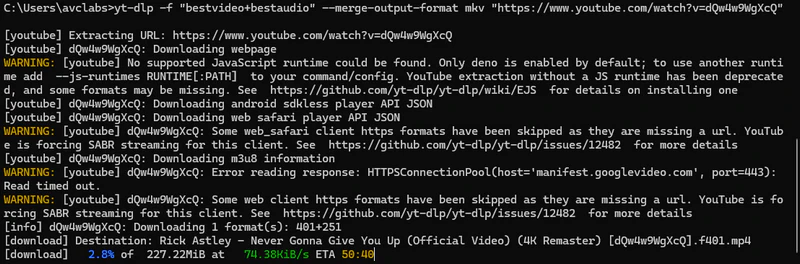
Step 1: Install yt-dlp and FFmpeg (it's a bit complicated for beginners).
Step 2: Launch a command prompt: yt-dlp -f "bestvideo+bestaudio" --merge-output-format mkv "video URL". There are other command-line syntaxes, but you'll need to learn.
Part 6: FAQ About YouTube to MKV
Q1: How to Play YouTube to MKV Video on iPhone?
MKV videos cannot be played directly on iPhone devices. You need to use a third-party player such as VLC for Mobile to play MKV videos.
Q2: Which is better, MKV or MP4?
Both MKV and MP4 are excellent video formats; which one is "better" depends on your specific needs.
| MKV | MP4 | |
| Performance | Extremely high; supports multiple audio and video codecs, multiple audio tracks, and embedded subtitles. | Limited; primarily supports common encoding methods such as H.264/265 and AAC. |
| Compatibility | Poor; some devices require transcoding. | Excellent; natively supported by almost all devices. |
| Subtitle support | Powerful; can embed subtitles of multiple formats without requiring transcoding. | Weak; requires soft subtitles (such as those for streaming media) or hard-burned video. |
| Main purpose | HD film and television collection, multilingual resources | Streaming media, social media sharing, mobile |
Q3: Why does downloading from YouTube to MKV fail?
1. Check if there is sufficient disk space; insufficient space will cause the conversion to fail.
2. Check file path permissions.
3. Ultra-high definition (8K) or specially encoded videos may exceed the tool's processing capabilities.
4. Unstable network connections during the download process may result in incomplete data and conversion failures.
Q4: How to batch download YouTube videos as MKV files?
Step 1: Use Any Video Converter's built-in YouTube browser.
Step 2: Click "Add to Parsing List" to add the currently playing video to the parsing list. Then play the next video and repeat the adding process.
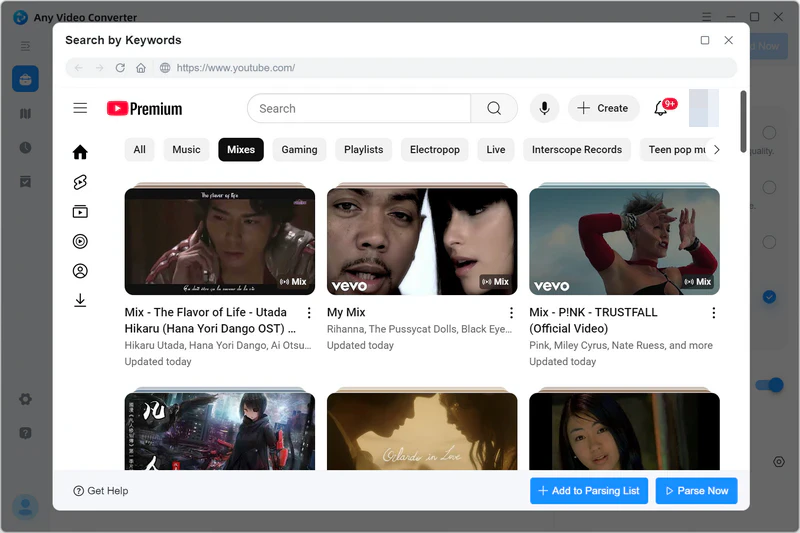
Step 3: Click "Parse Now" to start batch analyzing all video URLs.
Step 4: Select "Download as MKV" and click "Download Now" to directly download YouTube videos to MKV files.
Q5: Does YouTube accept MKV?
Yes, YouTube supports uploading MKV video files. However, YouTube officially recommends using an MP4 with H.264 video encoding and AAC audio encoding. This is the most compatible and reliable choice.
Q6: Are there any extensions for YouTube to MKV?
No. In actual testing, many extensions were unable to download YouTube videos and therefore could not be converted to MKV format.
You may want to know: 100% Working YouTube Video Downloader Extensions
Final Thoughts
YouTube4KDownloader, as an online tool, cannot save subtitles and HDR videos; Seal is limited by mobile phone performance and is less efficient when processing HD videos; while yt-dlp requires some command-line experience.
Only Any Video Converter, with its ease of use, comprehensive and stable features, support for 4K/8K/HDR videos to MKV, and complete preservation of audio tracks, subtitles, and video metadata, is the most suitable YouTube to MKV converter for quickly, stably, and with high quality saving YouTube content on your computer.


Besty Smith | Content Writer
Besty Smith is a talented and insightful content creator with a keen interest and passion for software programs. She focuses on in-depth research and hands-on experience with various types of software, providing readers with in-depth and inspiring content through precise writing. With her keen insight into the software industry, Besty is committed to helping readers keep abreast of the latest industry trends so that they can stay competitive in the digital age.