
How to Fix Error 403 When Downloading YouTube Videos
Error 403 occurs when YouTube temporarily restricts your IP address. This typically happens if there are frequent or repeated download requests, which can trigger a restriction and block further downloads. Be mindful of download frequency to avoid this issue.
To resolve this issue, please try the following solutions:
1. Avoid Bulk and Frequent Download Requests: Continuous, large-scale, or frequent download requests may raise suspicion and cause YouTube to block your IP. Try downloading videos in moderation.
2. Pause Download Attempts: Temporarily halting your download attempts for a few days may allow YouTube to lift the restriction on your IP.
3. Change Your IP Address to Resume the Downloads Immediately: If convenient, you can switch to a different network (such as through a different Wi-Fi connection or using a mobile hotspot) to bypass the restriction and resume downloading immediately.
4. Connect to a different server or port. If you are using a VPN or proxy, please connect to another port or server and try again.
What should I do if the problem persists?
If the issue continues after following the troubleshooting solutions above, please reach out to our support team for further assistance. Here's how to report the problem:
1. Open the Help Center: Click  icon, then select "Feedback" to open the feedback form.
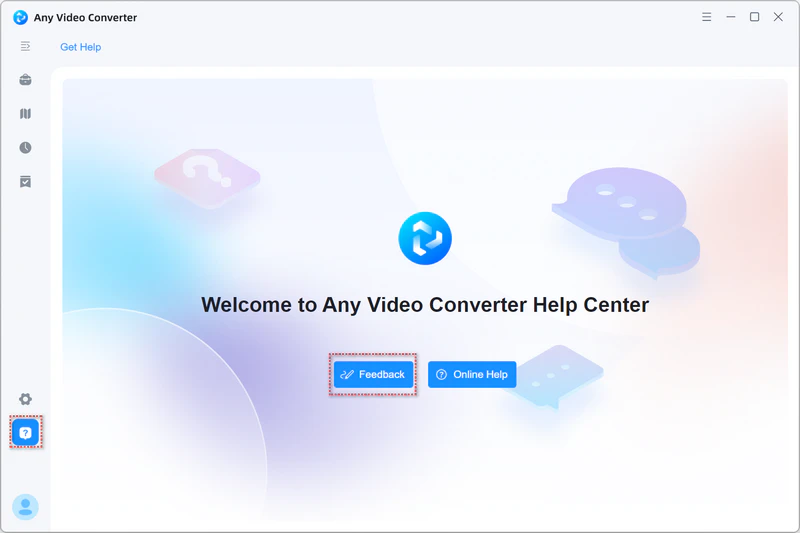
2. Describe the Issue: Provide a detailed description of the problem you're experiencing.
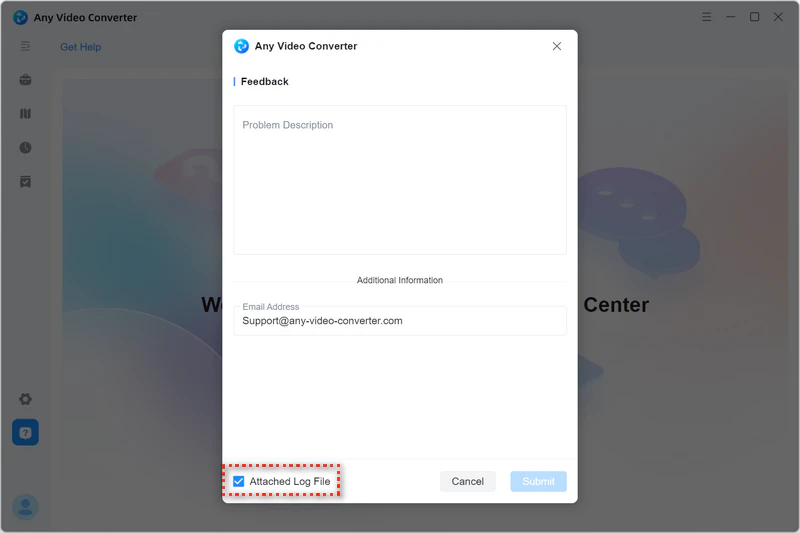
3. Provide Your Email: Enter the email address you use for communication. This ensures we can get back to you.
4. Attach the Log File: Make sure to check the box for "Attached Log File".
5. Submit. After filling out the form with the necessary information, click the "Submit" button to submit the bug report to our support team.
 Video Download Tutorials